
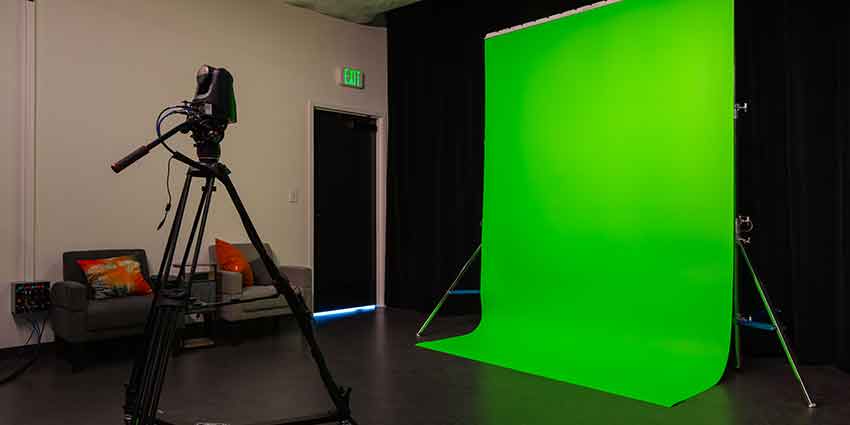
A green screen for business videos gives you the option to record in a studio and place almost any background behind you during editing. That could be your company’s branding, a photograph, a video, a presentation, or a setting that would otherwise be difficult to record in.
But having all those options doesn’t mean every video needs an elaborate background. Sometimes a simple design with your logo is all you need.
The important part is understanding what a green screen can do and deciding how you want to use it before recording.
How Does a Green Screen Work?
When you record in front of a green screen, the camera captures you against a solid green background.
During editing, that green color is removed through a process called chroma keying. The editor then replaces it with another image, video, or graphic.
For example, you could record a presentation in Orlando and have the finished video show you standing in front of a digital display with your company’s logo and information.
The background isn’t physically there during recording. It’s added afterward.
This is why proper lighting and camera setup are important. If the green screen has shadows or uneven lighting, removing the background cleanly can become more difficult.
What Can Businesses Actually Do With a Green Screen?
There are several practical ways businesses can use green screen recording, and they don’t all require complicated production.
1. Create Branded Business Videos
Suppose you’re recording a short video introducing your company or explaining one of your services.
Instead of sitting in front of an office wall, you could appear against a custom background using your company colors, logo, and other branded elements.
This can be particularly useful if you’re planning a series of videos and want them to have a consistent appearance.
You can also update the background design for future recordings without needing to change the physical studio.
2. Explain Information With Graphics
Some subjects are easier to understand when people can see what you’re talking about.
A REALTOR® could explain local housing market statistics while charts appear beside them. A mortgage professional could discuss different loan options using simple graphics. An instructor could walk viewers through a process while related information appears on screen.
Rather than switching between the presenter and a full-screen graphic, green screen production can allow both to appear together.
However, don’t overload the screen with information. If viewers are trying to read six different numbers while listening to you explain something else, the graphics may become more distracting than helpful.
Choose visuals that support what you’re saying.
3. Record Videos for Different Locations
You may want a video that refers to a particular location without physically traveling there.
For example, a company with several offices could record one presentation and create versions with different location-specific backgrounds or information.
A business promoting an event could use a photograph of the venue behind the speaker. This can be useful when traveling to the location would add unnecessary time or expense.
Just be careful about how the video is presented. If the background shows a place where you weren’t actually recording, don’t suggest that the footage was filmed there.
4. Produce Educational Videos
Green screen recording can work well for training, tutorials, and educational presentations.
Think about an instructor explaining a process that normally requires several slides. Rather than recording the entire lesson as a screen presentation, the instructor can appear beside the relevant information.
A home inspector might explain common roof problems while photographs of different conditions appear behind them.
A business consultant could walk through a diagram, and a real estate instructor could discuss contract terminology while displaying examples.
The person explaining the subject remains visible while the audience follows the material.
What Can Businesses Actually Do With a Green Screen?
Plan Your Background Before You Record
Here’s something we recommend to clients considering green screen production: decide what should appear behind you before coming into the studio.
You don’t necessarily need to have the finished graphic ready, but you should have a general idea.
- Are you planning to use your company logo?
- A photograph?
- Charts?
- An animated background?
- Will information appear to your left or right?
These details affect how the recording should be framed.
If you’re going to stand on one side of the screen while graphics appear on the other, we need to leave enough room for those graphics.
It’s much easier to plan that during recording than to discover afterward that the person on camera is standing exactly where the information needs to appear.
What Should You Wear for Green Screen Recording?
Clothing is worth thinking about before your session.
The most obvious recommendation is to avoid wearing green. If your shirt is close to the color of the background, parts of it may disappear when the green is removed during editing.
Very reflective materials can also create problems because they may pick up green reflections from the background.
Clothing with extremely fine patterns can sometimes create distracting visual effects on camera.
You don’t need to buy a special outfit. Solid colors that contrast with the green background are usually a good starting point. If you’re unsure, bring a second option.
What About Lighting and Editing?
Green screen production involves more than placing someone in front of green fabric.
The background needs even lighting, and the person on camera should be lit separately so they look natural against the background that will be added later.
The editor also needs to pay attention to the edges around hair, clothing, and movement. A poorly prepared green screen recording can leave visible green outlines or make the subject look as though they were pasted onto another image.
After removing the green background, additional adjustments may be needed to make the lighting and colors look consistent with the replacement background.
If you’re planning animated graphics or other visual effects, that work also needs to be considered when estimating editing time.
Does Every Business Video Need a Green Screen?
No, and that’s worth mentioning. If you’re recording a customer testimonial, an interview, or a personal message, a real studio background may work better.
Green screen makes sense when changing the background helps you explain something, show information, or create a particular look.
For a simple video answering a customer question, it may not add anything necessary.
The decision should come from what you’re trying to communicate rather than using green screen simply because it’s available.
Green Screen Recording at OASIS Studios in Orlando
At OASIS Studios in Orlando, our City Beautiful Studio offers green screen recording for businesses, REALTORS®, organizations, educators, and content creators.
We can help with cameras, lighting, audio, recording, background replacement, editing, graphics, and branding based on your project.
If you’re considering a green screen video, tell us what you’d like to talk about and what you imagine appearing behind you. You don’t need to understand chroma keying or know how to create the graphics yourself.
We’ll help you determine what needs to be recorded and what can be added during editing.
A green screen gives you plenty of options, but the best results come from knowing what you want the viewer to see before the cameras start recording.